



Getting Started with Azure DevOps: What it Is and What it Is Not
In the current software world, organizations are embracing the DevOps journey to achieve faster delivery, improved quality, and seamless collaboration between teams. As businesses move toward continuous integration (CI) and continuous delivery (CD), selecting the right DevOps platforms becomes critical. One of the most widely adopted platforms in this space is Azure DevOps.
This blog explores what Azure DevOps is, what it is not, how it fits into your broader DevOps adoption strategy, and how it compares to other platforms like AWS DevOps.
What is Azure DevOps?
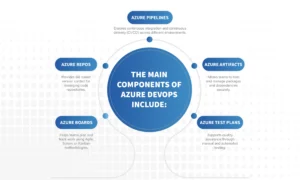
Azure DevOps is a cloud-based platform from Microsoft that offers a comprehensive suite of services supporting every stage of software development. It provides tools for planning, coding, building, testing, releasing, and monitoring applications. In simple terms, Azure DevOps brings together people, processes, and technology to enable the continuous delivery of value to customers. It is a unified DevOps solution that simplifies how development and operations teams collaborate to build and ship software faster. The main components of Azure DevOps include:
- Azure Boards: Helps teams plan and track work using Agile, Scrum, or Kanban methodologies.
- Azure Repos: Provides Git-based version control for managing code repositories.
- Azure Pipelines: Enables continuous integration and continuous delivery (CI/CD) across different environments.
- Azure Artefacts: Allows teams to host and manage packages and dependencies securely.
- Azure Test Plans: Supports quality assurance through manual and automated testing.
What Azure DevOps Is Not
While Azure DevOps is powerful, it is important to clarify what it is not so that organizations adopt it with the right expectations.- Azure DevOps is not just another code repository like GitHub. It includes integrated project management, CI/CD pipelines, artifact management, and testing tools, making it much more than version control.
- It is not a plug-and-play DevOps transformation tool. DevOps is a cultural and operational shift, not just a technology. Successful adoption still requires changes in mindset, processes, and collaboration.
- It is not limited to Microsoft Azure. Despite its name, Azure DevOps supports deployments to multiple environments, including DevOps on AWS, on-premise servers, and other cloud platforms.
- It is not the only DevOps platform available. Organizations often use Azure DevOps alongside other DevOps tools like Jenkins, GitHub Actions, or AWS CodePipeline, depending on their technology stack.
- Most importantly, Azure DevOps is not a shortcut to building DevOps maturity. It is a framework that supports your existing DevOps practices but cannot replace a strong culture of collaboration, automation, and accountability.
Why Azure DevOps Matters in Your DevOps Journey
When businesses begin their DevOps journey, the first challenge is aligning tools, teams, and processes. Azure DevOps simplifies this by offering an integrated environment that covers every aspect of the software lifecycle.1. Integrated Toolset Across the Lifecycle
Instead of stitching together multiple tools, Azure DevOps provides everything under one roof. From project tracking to code deployment, it streamlines workflows and improves transparency across teams.2. Flexibility and Extensibility
Azure DevOps is modular. Teams can use one, some, or all of its services. It integrates with hundreds of third-party tools, allowing flexibility in building a DevOps solution that matches your needs.3. Multi-Cloud and Hybrid Compatibility
Although built by Microsoft, Azure DevOps supports multiple environments including DevOps on AWS and on-premise infrastructures. This makes it ideal for organizations with hybrid or multi-cloud strategies.4. Alignment with DevOps Practices
The platform encourages teams to adopt best DevOps practices such as continuous integration, automated testing, continuous delivery, and infrastructure as code.5. Enhanced Collaboration and Traceability
Azure DevOps bridges the gap between developers and operations teams. Every change is traceable from code commit to deployment, ensuring accountability and faster issue resolution.Azure DevOps and AWS DevOps: How They Coexist
Organizations often ask whether they should choose Azure DevOps or AWS DevOps. The truth is that both can coexist depending on your environment and goals. AWS DevOps offers native services such as AWS CodeCommit, CodeBuild, CodeDeploy, and CodePipeline. These tools work well for applications hosted entirely on AWS. However, many enterprises operate in multi-cloud environments. Here is where Azure DevOps stands out. You can build pipelines in Azure DevOps that deploy to AWS resources, effectively running DevOps on AWS while managing workflows within Azure’s ecosystem. Conversely, AWS DevOps services can integrate with Azure Boards or Repos for tracking and collaboration. In other words, Azure DevOps is not in competition with AWS DevOps. It is part of a broader DevOps platform landscape that encourages interoperability. The key for any DevOps engineer or DevOps developer is to understand both ecosystems and design pipelines that fit the business architecture rather than the other way around.The Core of DevOps: People, Practices, and Process
No DevOps platform can succeed without well-defined practices and a strong team culture. Azure DevOps provides the tools, but the success of your DevOps journey depends on how you use them.Core DevOps Practices include:
- Continuous Integration: Frequent code commits with automated builds and testing.
- Continuous Delivery: Automated deployment pipelines that promote code to production safely and quickly.
- Infrastructure as Code: Managing infrastructure through configuration files and automation tools.
- Automated Testing: Running tests automatically to detect issues early.
- Monitoring and Feedback: Using analytics to drive continuous improvement.
- Collaboration: Encouraging developers, testers, and operations teams to work as one unit.
The DevOps Process typically involves:
- Planning and tracking work with Azure Boards or similar tools.
- Writing and managing code in Azure Repos or external Git systems.
- Building and testing automatically using Azure Pipelines.
- Deploying through continuous delivery pipelines.
- Monitoring and analyzing results.
- Gathering feedback to improve the next release.
Common Challenges in DevOps Adoption
Many organizations struggle with DevOps adoption because they focus too much on tools and too little on processes. Here are common pitfalls to avoid:- Implementing Azure DevOps without defining the DevOps process.
- Assuming the tool will automatically fix collaboration issues.
- Underestimating the integration effort with existing DevOps tools.
- Ignoring team training and cultural alignment.
- Limiting DevOps to a single department instead of organization-wide adoption.
The Role of DevOps Engineers and Developers
Both DevOps engineers and DevOps developers play vital roles in making Azure DevOps work effectively.- DevOps Engineers design CI/CD pipelines, integrate automation tools, manage infrastructure, and monitor systems.
- DevOps Developers focus on building code that aligns with automation principles, writing tests, and improving code quality.
Getting Started with Azure DevOps
Here is a simple roadmap for teams new to Azure DevOps:- Start with a pilot project to test workflows.
- Define your DevOps process before adopting the tools.
- Set up version control and establish branching strategies.
- Build your CI/CD pipelines and automate testing.
- Deploy gradually to different environments and monitor results.
- Collect feedback and continuously refine processes.
- Scale the model across multiple teams once proven.


