



From Code to Production: Getting Started with Azure DevOps Pipelines
Over 70% of high-performing engineering teams deploy production code multiple times every day.
This is not an accident; it is an outcome of significant automation, and tools like Azure DevOps Pipelines are central to these organizations’ success.
If you haven’t yet automated your deployments or are utilizing an inconsistent CI/CD system, it is time to rethink your strategy. Let’s expand on why Azure DevOps Pipelines are often the choice for organizations operating at high speed and how you can use Azure DevOps Pipelines to elevate your delivery capability.
What Are Azure DevOps Pipelines?
In essence, Azure DevOps Pipelines is a cloud CI/CD service that enables all the automation of your software build, test, and deployment process. You can use JavaScript, Python, .NET, or even containerized apps- in all cases these pipelines help you deliver faster and more reliably.
The best part? You define everything in code, so your whole pipeline setup is version controlled, repeatable, and scalable.
Why Use Pipelines in Azure DevOps?
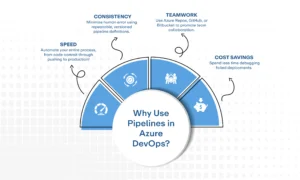
Let’s get right to it. Here’s what you get by using Azure DevOps pipelines:
- Speed: Automate your entire process, from code commit through pushing to production!
- Consistency: Minimize human error using repeatable, versioned pipeline definitions.
- Teamwork: Use Azure Repos, GitHub, or Bitbucket to promote team collaboration.
- Cost Savings: Spend less time debugging failed deployments.
Teams using automation with Azure DevOps have reported fewer bugs in production and faster release cycles. Everyone wins, development and users alike!
CI/CD Implementation with Azure: A Quick Overview
If you’re interested to learn how CI/CD implementation works with Azure, well, here is the simplified explanation:
- CI (Continuous Integration): Each new code commit signals the system to build and test automatically. This is done quickly with Azure Pipelines to allow developers to identify problems sooner rather than later.
- CD (Continuous Delivery/Deployment): Once CI has successfully completed, the code is then automatically deployed to either staging or production, without manual intervention.
And don’t worry, you just need to add a few YAML (YAML Ain’t Markup Language) files to configure your entire pipeline flow. Even if you are not into YAML, you can still use the classic editor.
Automation in Azure: Making DevOps Effortless
Let’s face it, nobody likes to spend hours on deploying their code. When we use automation out of Azure DevOps, we no longer are.
You can schedule builds, run parallel jobs, include test suites, and deploy to VMs, containers, or cloud services, all running on autopilot. Automation in Azure DevOps takes care of the mundane pieces, allowing your team to focus on shipping the best features possible.
Azure DevOps Overview: More Than Just Pipelines
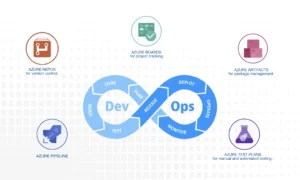
Although pipelines are the most well-known of these features, an overview of Azure DevOps wouldn’t be complete without discussing the full suite of the product as follows:
- Azure Boards for project tracking.
- Azure Repos for version control.
- Azure Test Plans for manual and automated testing.
- Azure Artifacts for package management.
Azure DevOps is a full-service platform to support modern software delivery at either a startup or enterprise level.
Getting Started: Your First Pipelines Azure DevOps Setup
To create a basic pipeline in Azure DevOps, you will need to start by selecting the branch you want to monitor; most teams go with main. Then select the environment that your builds will be running on, e.g., an Ubuntu-based agent.
Next, determine what steps your pipeline should take. A simple example could include:
- Installing the necessary programming language or runtime (for example, Node.js).
- Fetching and installing your project dependencies.
- Running automated tests to ensure nothing breaks.
- Building the application so it’s ready for deployment.
When it is all done, every time you push changes to the branch, the pipeline will trigger automatically to run those steps, keeping your builds fast, consistent, and hands-free.
Final Thoughts
The bottom line? Azure Pipelines can completely change how you ship software. If you’re committed to automation, scale, and speed of delivery, then there’s no reason to not get started with creating pipelines in Azure DevOps.
Once you take the plunge, consider it an investment in time and knowledge. A few hours setting up your pipelines now can save you hundreds of hours in the future and dramatically improve your team’s velocity along the way.
So don’t wait around. Start small, automate smart, and let the Azure platform take care of the heavy lifting for you.


